I was probably 15 or 16 years old when computers first started appearing at the consumer level.
In the late 1970s, these were mostly for playing games. I played Pong (1972) and Asteroids (1979) on the first arcade consoles; Air-Sea Battle (1977) at Sears on the Atari VCS; Carriers at War (1984) on the Apple ][, and Crush, Crumble and Chomp! (1981) on the TRS-80.
My first experience using a computer for anything other than games was the University of Maine mainframe in 1982, long before the invention of the Web (1989) or even the TCP/IP protocol (1983) that heralded the creation of the Internet.
This was a time when card punches and readers were still being actively used. Students preferred to do homework on paper-fed teletype terminals like the DECwriter II rather than video display monitors, because they would still have a printed record of their assignment if the mainframe crashed and lost their work. It would be years before the first IBM PC model would appear on campus.
It’s a fair question to ask: with no games and no Internet, what did we actually do on the university computer?
Herein lies an interesting tale. You see, before TCP/IP, IBM had created its own networking protocol called RSCS, and in 1981 – a year before I arrived at UMaine – RSCS was used to connect computers at UMaine, Yale, CUNY, and a handful of other colleges in an academic network known as BITNET. BITNET allowed users at different sites to send programs and data files to one another, exchange email, and send interactive messages, and it would eventually grow to over 3,000 universities across much of the developed world.
In 1982, the idea of being able to send an instant message to someone across campus – or even across the country! – was incredibly compelling.
But RSCS messages weren’t all that. An incoming message would interrupt whatever you were doing, whether that was running a program, archiving files to magnetic tape, or composing a term paper. Each message was separate; there was no concept of an ongoing conversation, and there was no way to include anyone other than the sender and one recipient.

TeleVideo 925 terminal
That all changed in 1983, when one of our university’s computer center staffmembers took an example program from a magazine and ran it on his mainframe account: WGH@MAINE. The program was what we called “a chat machine”; users across BITNET could sign in and send messages to it, and the program would echo those messages to all the other signed-in users. It was the ultimate ancestor of later services like Chat@PSUVM1, Relay@Bitnic, IRC, and Discord.
And its use spread like wildfire among the undergrads. If you were a smart kid who wasn’t into partying, then hanging out on a chat machine was how you spent your time. I devoted endless hours with a cadre of other geeks in the mainframe’s “user area”, idly hanging out on these early chat machines, conversing by text message with an increasingly familiar set of students from random sites across the world. I joined several other Mainers in making the trip down to New York City to attend the world’s first ChatCon meetup in 1984.
These days, I still retain a deep sense of nostalgia for those early days, and keep a few of the memories alive in odd, eccentric ways. Not only does my laptop’s “Terminal” window open in the classic green-on-black of a monochrome mainframe terminal, with the standard CMS “Ready;” prompt, but it also paints the default character-graphic VM/370 login panel. I wish one of my friends still had a copy of the old CAPS/UMaine login panel: an outline of the state of Maine, done in asterisk characters!
My Terminal window also uses the same idiosyncratic font-face as the huge old IBM 3278 terminals of the day. That’s kind of an indulgence, because I never used one… The only 3278s were kept inside the mainframe machine room; lowly student users like me only had access to TeleVideo 925 or 955 terminals… And no one has bothered to port those terminals’ fonts to modern Truetype or Postscript files!
One of the attributes of those mainframe terminals that I recall most fondly were their industrial-strength keyboards. They were of the same vintage as IBM’s “Big Iron” mainframes, long before “planned obsolescence” was a thing. Those keyboards were built to easily withstand a decade of student use, or a direct thermonuclear explosion, whichever came first.
Those old 4½ pound mainframe keyboards were so different from the flimsy, commodity rubber membrane actuated keyboards you get today, or the 1.4 pound Apple Magic Keyboard with its little scissor switches and a mere 1.15mm of key travel. And frankly I really missed the typing experience of a solid, durable keyboard with mechanical switches.
So now I have to admit… This whole nostalgia dump was really just a lead-up to this: I recently bought my first mechanical keyboard.
Now the first thing I’m gonna do is warn you: if you get intimidated by too many choices, selecting a mechanical keyboard is a complete morass! You’re absolutely inundated with choice, beginning with what size keyboard you want, and what keyboard layout. Then there’s tons of different keycaps to choose from, coming not just in different colors, but with different heights and profiles. Next there’s hundreds of different types of switches, with different travel, activation, and sound profiles. Mechanical keyboards are – unexpectedly – one of those incredibly detailed, technical areas that enthusiasts love to submerse themselves into, for reasons known only to the cognoscenti.
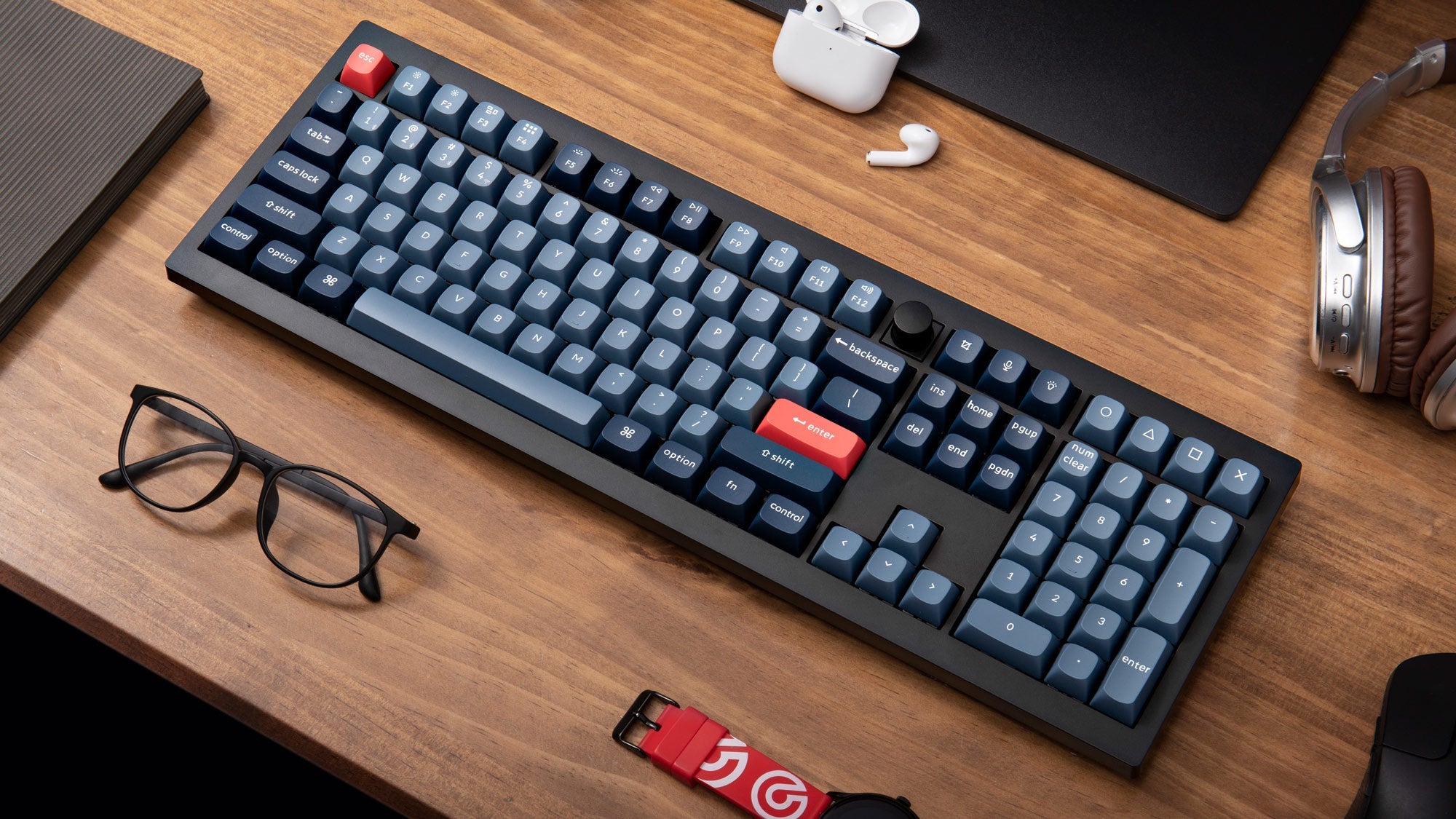
Saving you all the drama, I chose a Keychron V6 Max. I wanted something really traditional: a full-sized keyboard with dedicated function keys, arrow keys, and a number keypad, similar to the original IBM Enhanced PC keyboard, which is probably the most famous keyboard in history. The V6 Max is also wireless, which I prefer, given that I often type with the keyboard on my lap. And it’s sturdy, weighing in at 4.47 pounds, only half an ounce lighter than my beloved TeleVideo 925!
I kept the stock keycaps, which are a nice two-toned blue, with reddish ESC and ENTER keys. The keyboard has modes for both Mac and Windows, as well as dedicated keycaps for both OS’ idiosyncratic command keys.
Not knowing much about switches, I ordered two sets: the Gateron Jupiter Brown and Gateron Jupiter Banana, but I quickly opted to run the latter, which have a more satisfying sound, which will hopefully not perturb my housemate.
Other features… The keyboard is customizable with industry-standard QMK or VIA software. It also has a handy dedicated volume/mute knob on the top row just to the right of the F12 key. Like many modern keyboards, it comes with (often maligned) programmable LED backlighting, which I’ve set to simply flash blue underneath each key as it is activated. I also bought a nice clear plastic keyboard cover to put over it when not in use.
Having had it for six weeks, I have to say that it’s been a pure delight, and I find myself looking for reasons to sit down at the keyboard and bang away on it. In fact, I enjoy typing on it so much that I’ve been thinking about setting up a Discord text chat for a gathering of BITNET friends to revisit those old days when we used to spend hours upon hours typing to one another across the ether (hence the reminiscing about chat machines, above). And fair warning: another way I’ll satisfy my rejuvenated enthusiasm for typing is to produce more longwinded blogposts like this one!
I’ve only had two minor niggles. I had one bad switch – which happened to be on my ‘s’ key – that would register a double-strike about half the time. However, that was easily remedied by swapping the switch out. The other niggle is one I’ve had in the past with several other keyboards: the little rubber feet on the ends of the keyboard’s prop-up legs always seem to come loose for me, requiring an end-user application of superglue to stay put.
So after all that, the bottom line of this post was just to spend time gushing about having finally bought myself a quality keyboard. I’ve been dealing with garbage chiclet keyboards ever since I left college back in the late 1980s, and – given the amount of time I still spend sitting at the computer! – I was way overdue in treating myself to a higher quality input device.
And I’ll type, type, type till my baby takes my key-board away…
(no apologies to Brian Wilson)
![[personal profile]](https://www.dreamwidth.org/img/silk/identity/user.png)


![[livejournal.com profile]](https://www.dreamwidth.org/img/external/lj-userinfo.gif)
