ornoth: (Default)
2024-12-02 10:42 am

Memorabilia: Punch Cards

Recently, in my post about my new computer keyboard, I mentioned that punch cards were still in use when I was in college. Did you question that story? Well, lookee here!

Saved punch card deck

Now, I didn’t say they were common. There was only one card punch and one card reader in the university computer center, and by the time I graduated, even these peripherals had been removed. You didn’t see them very often, but every so often you’d see an old card deck lying around, possibly abandoned.

That’s how I came across a box of cards labeled “Egypt Dictionary” and adopted it.

Why bother? For one thing, they were a disappearing rarity. But I’d also grown accustomed to using them for jotting down lists and notes, kind of like then-recently-invented Post-It notes, only free, a more usable size, and more robust thanks to being made from card stock. Although I gotta admit that blank cards would have been a lot more convenient than cards that already had holes punched in them!

And lest you think the University of Maine was some rustic relic still using peripherals that were backward-compatible with rocks, here’s a very stylish customized punch card that I procured while visiting the City University of New York’s Queens College computer center in 1985:

CUNY punch card

But while we’re discussing the computer equivalent of the Stone Age, here’s Page 218 from Pugh, Johnson, and Palmer’s 1991 book, “IBM’s 360 and Early 370 Systems” showing one of IBM’s early innovations for permanent storage: Mylar punch cards!!!

Early IBM fixed storage: Mylar punch cards

How, you might ask, did I know that image was on Page 218? Well, I found it quickly because I’d left a bookmark on that page in my copy. That bookmark was, in fact, an exceptionally appropriate use for one of my old punch cards!

ornoth: (Userinfo)
2024-11-15 08:32 am

Retrogression Analysis

I was probably 15 or 16 years old when computers first started appearing at the consumer level.

In the late 1970s, these were mostly for playing games. I played Pong (1972) and Asteroids (1979) on the first arcade consoles; Air-Sea Battle (1977) at Sears on the Atari VCS; Carriers at War (1984) on the Apple ][, and Crush, Crumble and Chomp! (1981) on the TRS-80.

My first experience using a computer for anything other than games was the University of Maine mainframe in 1982, long before the invention of the Web (1989) or even the TCP/IP protocol (1983) that heralded the creation of the Internet.

This was a time when card punches and readers were still being actively used. Students preferred to do homework on paper-fed teletype terminals like the DECwriter II rather than video display monitors, because they would still have a printed record of their assignment if the mainframe crashed and lost their work. It would be years before the first IBM PC model would appear on campus.

It’s a fair question to ask: with no games and no Internet, what did we actually do on the university computer?

Herein lies an interesting tale. You see, before TCP/IP, IBM had created its own networking protocol called RSCS, and in 1981 – a year before I arrived at UMaine – RSCS was used to connect computers at UMaine, Yale, CUNY, and a handful of other colleges in an academic network known as BITNET. BITNET allowed users at different sites to send programs and data files to one another, exchange email, and send interactive messages, and it would eventually grow to over 3,000 universities across much of the developed world.

In 1982, the idea of being able to send an instant message to someone across campus – or even across the country! – was incredibly compelling.

But RSCS messages weren’t all that. An incoming message would interrupt whatever you were doing, whether that was running a program, archiving files to magnetic tape, or composing a term paper. Each message was separate; there was no concept of an ongoing conversation, and there was no way to include anyone other than the sender and one recipient.

TeleVideo 925 terminal

TeleVideo 925 terminal

That all changed in 1983, when one of our university’s computer center staffmembers took an example program from a magazine and ran it on his mainframe account: WGH@MAINE. The program was what we called a chat machine; users across BITNET could sign in and send messages to it, and the program would echo those messages to all the other signed-in users. It was the ultimate ancestor of later services like Chat@PSUVM1, Relay@Bitnic, IRC, and Discord.

And its use spread like wildfire among the undergrads. If you were a smart kid who wasn’t into partying, then hanging out on a chat machine was how you spent your time. I devoted endless hours with a cadre of other geeks in the mainframe’s “user area”, idly hanging out on these early chat machines, conversing by text message with an increasingly familiar set of students from random sites across the world. I joined several other Mainers in making the trip down to New York City to attend the world’s first ChatCon meetup in 1984.

These days, I still retain a deep sense of nostalgia for those early days, and keep a few of the memories alive in odd, eccentric ways. Not only does my laptop’s “Terminal” window open in the classic green-on-black of a monochrome mainframe terminal, with the standard CMS “Ready;” prompt, but it also paints the default character-graphic VM/370 login panel. I wish one of my friends still had a copy of the old CAPS/UMaine login panel: an outline of the state of Maine, done in asterisk characters!

My Terminal window also uses the same idiosyncratic font-face as the huge old IBM 3278 terminals of the day. That’s kind of an indulgence, because I never used one… The only 3278s were kept inside the mainframe machine room; lowly student users like me only had access to TeleVideo 925 or 955 terminals… And no one has bothered to port those terminals’ fonts to modern Truetype or Postscript files!

One of the attributes of those mainframe terminals that I recall most fondly were their industrial-strength keyboards. They were of the same vintage as IBM’s “Big Iron” mainframes, long before “planned obsolescence” was a thing. Those keyboards were built to easily withstand a decade of student use, or a direct thermonuclear explosion, whichever came first.

Those old 4½ pound mainframe keyboards were so different from the flimsy, commodity rubber membrane actuated keyboards you get today, or the 1.4 pound Apple Magic Keyboard with its little scissor switches and a mere 1.15mm of key travel. And frankly I really missed the typing experience of a solid, durable keyboard with mechanical switches.

So now I have to admit… This whole nostalgia dump was really just a lead-up to this: I recently bought my first mechanical keyboard.

Now the first thing I’m gonna do is warn you: if you get intimidated by too many choices, selecting a mechanical keyboard is a complete morass! You’re absolutely inundated with choice, beginning with what size keyboard you want, and what keyboard layout. Then there’s tons of different keycaps to choose from, coming not just in different colors, but with different heights and profiles. Next there’s hundreds of different types of switches, with different travel, activation, and sound profiles. Mechanical keyboards are – unexpectedly – one of those incredibly detailed, technical areas that enthusiasts love to submerse themselves into, for reasons known only to the cognoscenti.
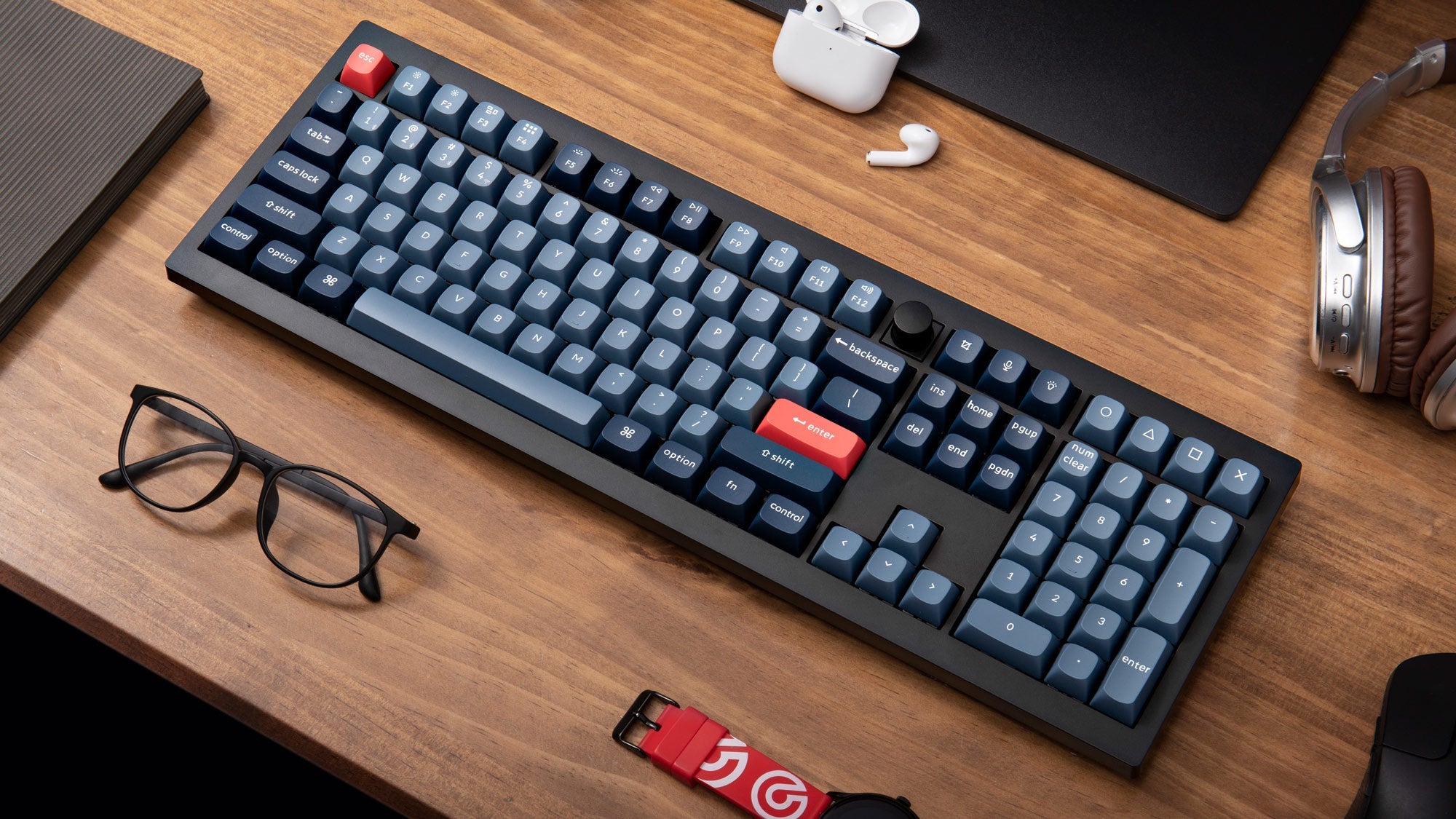
Keychron V6 Max keyboard

Saving you all the drama, I chose a Keychron V6 Max. I wanted something really traditional: a full-sized keyboard with dedicated function keys, arrow keys, and a number keypad, similar to the original IBM Enhanced PC keyboard, which is probably the most famous keyboard in history. The V6 Max is also wireless, which I prefer, given that I often type with the keyboard on my lap. And it’s sturdy, weighing in at 4.47 pounds, only half an ounce lighter than my beloved TeleVideo 925!

I kept the stock keycaps, which are a nice two-toned blue, with reddish ESC and ENTER keys. The keyboard has modes for both Mac and Windows, as well as dedicated keycaps for both OS’ idiosyncratic command keys.

Not knowing much about switches, I ordered two sets: the Gateron Jupiter Brown and Gateron Jupiter Banana, but I quickly opted to run the latter, which have a more satisfying sound, which will hopefully not perturb my housemate.

Other features… The keyboard is customizable with industry-standard QMK or VIA software. It also has a handy dedicated volume/mute knob on the top row just to the right of the F12 key. Like many modern keyboards, it comes with (often maligned) programmable LED backlighting, which I’ve set to simply flash blue underneath each key as it is activated. I also bought a nice clear plastic keyboard cover to put over it when not in use.

Having had it for six weeks, I have to say that it’s been a pure delight, and I find myself looking for reasons to sit down at the keyboard and bang away on it. In fact, I enjoy typing on it so much that I’ve been thinking about setting up a Discord text chat for a gathering of BITNET friends to revisit those old days when we used to spend hours upon hours typing to one another across the ether (hence the reminiscing about chat machines, above). And fair warning: another way I’ll satisfy my rejuvenated enthusiasm for typing is to produce more longwinded blogposts like this one!

I’ve only had two minor niggles. I had one bad switch – which happened to be on my ‘s’ key – that would register a double-strike about half the time. However, that was easily remedied by swapping the switch out. The other niggle is one I’ve had in the past with several other keyboards: the little rubber feet on the ends of the keyboard’s prop-up legs always seem to come loose for me, requiring an end-user application of superglue to stay put.

So after all that, the bottom line of this post was just to spend time gushing about having finally bought myself a quality keyboard. I’ve been dealing with garbage chiclet keyboards ever since I left college back in the late 1980s, and – given the amount of time I still spend sitting at the computer! – I was way overdue in treating myself to a higher quality input device.

And I’ll type, type, type till my baby takes my key-board away…
(no apologies to Brian Wilson)

ornoth: (Userinfo)
2024-09-01 08:34 pm

Binary Digits

Say you were a young college student taking a programming class, and your aging computer science professor’s first assignment was for each student to write a program to print out their name and telephone number.

Struble's Assembler Language Programming

That wouldn’t be the least bit sus, now would it?

Apparently, back in 1984 it wasn’t! Lemme tell you a story…

I was recently bedridden with both a back injury and my first case of Covid. And having already purged many of my old books, I really had to stretch (metaphorically, of course) to find something to entertain myself with.

One book that followed me through my migrations – from Maine to (five different locations in) Massachusetts, then Pittsburgh, and finally Texas – was a college textbook that was highly cherished by most of the CS majors I knew back then: George Struble’s “Assembler Language Programming for the IBM System/370 Family”.

Yes, I was so bored that I started re-reading a 40 year old textbook on one of the driest topics in all of computer science, for a computer that no longer exists!

Chapter 1 is a snoozer (not unlike the rest of the book). It’s all about how mainframe computers used combinations of ones and zeroes to encode numbers and characters. Like any textbook, the end of Chapter 1 had a dozen exercises for the student to solve, to promote active learning and demonstrate a practical understanding of what’s been taught.

Here’s the text of Problem 1.3: (emphasis mine)

Each byte of storage in the IBM System/370 contains eight bits of information and one parity bit. The parity bit is redundant; it is used only to guarantee that information bits are not lost. The parity bit is set to 1 or 0 so as to make the sum of 1’s represented in the nine bits an odd number. For example, the character / is represented in eight bits (in EBCDIC) by 01100001. The parity bit to go with this character will be 0, because there are three 1’s among the information-carrying bits. The character Q is represented by 11011000, and the parity bit is set to 1, so there will be five 1-bits among the nine. These representations with parity bit (we call this “odd parity”) are also used in magnetic tape and disk storage associated with the IBM System/370. Using the character representation table of Appendix A, code your name and telephone number in eight-bit EBCDIC representations, and add the correct parity bit to each character.

That’s right: on just the third exercise in the entire book, Struble is asking the student to provide their personal contact info, presumably to their instructor. I can only imagine the repercussions if a professor presented this exercise to his or her class today.

To be fair, when Struble’s book came out (in 1969, then revised in 1974 and again in 1984) such an assignment simply wouldn’t have set off the red flags it does today. The author and his editors probably felt safe in the assumption that women wouldn’t be taking hard-core mainframe assembler classes. And for the odd exception, what harm could possibly come from a young coed revealing her phone number to an upstanding member of the academic community?

What harm, indeed.

I’m not one to condemn past generations for not living up to more modern social norms, but still… Today that exercise just screams of inappropriateness and invasion of privacy. For me, reading that was a head-scratching moment of astonishment from an unexpected source, a true blast from my past.

ornoth: (Default)
2020-10-06 09:51 am

One Bad Apple

After eight years of reliable service, it was time to replace my primary laptop, a 2012 MacBook Pro. It had been my first non-work Mac, and I gave it a lengthy review after buying it.

Back then, I luckily bought the last model before Apple made numerous user-hostile changes to their laptops, such as their unreliable butterfly keyboard, sub-par graphics, eliminating all user-serviceable or upgradeable components, and many other revisions I’ll mention below.

2020 MacBook Pro

So having avoided those pain points, I wasn’t predisposed against ordering another MBP when the old one wilted. And rather than go back to a Windows machine, I opted to replace like with like.

Let me start my review with the machine’s good points. They’re quickly enumerated:

  • A 16" screen in the same form factor as my old machine’s 15” display (smaller bezels). And my first Retina display.
  • After more than five years, but Apple begrudgingly reverted from that fragile butterfly keyboard back to their older scissor-switch keyboard.
  • Touch ID: a dedicated fingerprint reader as an option for user authentication.
  • Graphics performance has improved, which is good for Zwifting.

And that’s it. That’s all the improvements Apple made to their flagship laptop over the past eight years.

Now on to all the bad points. That'll take a lot more time to cover...

  • The machine has no external ports but the uncommon USB-C. No ethernet port, no standard USB-A, Mini USB, or Micro USB ports, no SD card or MicroSD card readers, no MiniDisplay port, no HDMI port. If you want to connect anything, you have to buy a separate adapter for each peripheral, all of which are obscenely overpriced.
  • I had a ton of problems setting up my external monitors. The first problem was that I got the wrong dongle, because although Thunderbolt and Mini DisplayPort are incompatible, they both use the exact same connector! Oh and Apple doesn’t sell a Mini DisplayPort dongle anyways. Once I purchased the right dongle from a third party, my other monitor still wouldn’t work until I replaced its previously-functional Mini DisplayPort cable with an HDMI cable.
  • On top of that, the MBP has a documented overheating problem when driving external monitors. That’s awesome!
  • No DVD reader or writer. Another separate expense… plus another dongle.
  • The power cord now comes in three pieces sold individually, and the machine only ships with two of them. The cord extension is another separate expense. With all three pieces, a spare power cord will now run you an extortionate $133. Plus it no longer uses the excellent MagSafe connector, so there’s no longer any light to visually indicate that the machine is connected to power and whether it’s fully charged or not.
  • Matte screens are no longer available. Glare, reflections, and fingerprints come standard, thanks to Apple’s “design” team.
  • Apple has removed the entire row of dedicated function keys and replaced them with a flat LCD with virtualized buttons. No, you can’t have them back. And although Apple says you can force virtual Fkeys to appear on an app-by-app basis, of course that doesn’t work with Zwift or VirtualBox: the two apps where I use Fkeys the most.
  • The laptop camera is still limited to a myopic 720p, no improvement over pre-2010 webcams.
  • Thanks to the timing rather than any fault of Apple, I’ll be missing out on several upcoming enhancements to the MBP, including the migration to Apple silicon, MiniLED displays, Wifi 6, 5G, Face ID, and touchscreens. On the other hand, that’s a lot of new features that Apple will probably completely fuck up. My previous laptop was also the model before major changes, and in the end that was a fortuitous thing.
  • Migration Assistant, which supposedly easily moves your old stuff onto your new machine simply doesn’t work. Twice I connected the two machines via wifi, and both times the process hung within the first few minutes. Then I tried running it from a USB hard drive containing my last Time Machine backup, and that hung. In fact, it hung so badly that the machine wouldn’t even boot afterward! I had to boot in emergency recovery mode, reformat the SSD drive, and waste several hours reinstalling the entire operating system from scratch! I eventually succeeded in transferring a few basic settings from the TM backup, but still had to move the overwhelming majority of my old data manually.
  • Similar story with moving my Time Machine backups from my old backup drive to the new one. Theoretically, you should just be able to copy the files over and resume backups. However, the MacOS file manager (the cutesy-named “Finder”) cannot handle large numbers of files, and aborted 8 hours into a copy operation. So I fell back to the commandline utility “rsync”, which similarly failed, this time after running for 14 hours. Like the Migration Assistant, these are dedicated programs that cannot do the one thing they exist to perform.

So much for the vaunted tagline “It’s Apple; it just works”. I could just have a apoplectic fit and die from the irony of that statement.

On the plus side, I’ve finally settled in and the machine is mostly working. But due to Apple’s unnecessarily lengthy order fulfillment, user-hostile hardware, and bug-ridden software it took me three weeks to get up and running on my new machine. That’s simply not acceptable.

I’m skeptical whether I’ll ever buy another Apple product. Their machines, which were once the best on the market, are handicapped by bug-ridden software and shortsighted, petty tactics to drive short-term sales at the cost of flexibility, maintainability, ease of use, overall cost, and (ultimately) user satisfaction.

As a young upstart back in 1984, Apple took on the faceless behemoth of IBM and eventually defeated them. But Apple became the exact thing they once denigrated so vociferously: a hard-to-use, bug-ridden, closed computing environment managed by a greedy, shortsighted, soulless company that exists solely to redistribute wealth from their unfortunate users to their shareholders.

Fuck Apple!

Now, with all that off my chest, there’s been a bunch of other technological developments over recent months that I’d like to mention. And all of them were more pleasant experiences than dealing with Apple!

Perhaps the most important one is getting a free license of Windows 10 running inside a VirtualBox VM on the new laptop. It seems like an excellent opportunity to begin migrating applications from MacOS back to Windows.

Along with the MacBook (plus four dongles, an additional power brick, a port expander, and two new cables), I also bought a new 10TB backup drive. TEN TERABYTES! In a device the size of a trade paperback (if you remember what those were)! Back in the day, I had to knock down office walls to create a machine room large enough to house eight refrigerator-sized IBM 3380Ds, just to get 20GB of storage: 1/500th the capacity of this little box I’m holding in one hand!

In addition to a couple free Alexa Dot voice assistants, I’ve added several voice-activated smart outlets around the house. The biggest win has been the ability to turn on (or off, I suppose) my big exercise fan without getting off the indoor bike. However, I ought to upgrade those soon, as they’re the only thing limiting our home wifi to 2.4GHz rather than 5GHz.

And although I’ve been tracking my weight, body composition, hydration, blood pressure, and resting heart rate for a decade, I’ve recently upgraded my health data collection. A new wifi-connected scale also collects BMI, bone and muscle mass, and should update my weight in Zwift automatically. And I’ve also purchased a thermometer and pulse oximeter to store temp and O2 saturation (a useful thing for an asthmatic).

So it’s been an interesting year on the tech front. I’m hesitant to jinx it, but hopefully the new laptop will last as long as my well-used old MacBook, which served me very well for eight long years.

ornoth: (Default)
2017-11-23 08:38 am

Fighting Cancer In My Sleep

You may recall hearing about the SETI@Home volunteer computing project back in 1999.

The idea was to collect a metric fuckton of data from the Arecibo radio telescope, split the raw data into digestible chunks, then farm the chunks out to thousands of volunteers, letting their home computers sift through the data looking for potential signals from extraterrestrial sources.

WCG screen saver

WCG screen saver

The sifting software ran in a low-priority background task as a screen saver. When you weren’t using your computer, its spare cycles could be used to perform useful scientific research. And *your* laptop might detect the first signal from intelligent life outside our solar system!

As an engineer, I’ve always had both work and home machines, plus older computers lying around gathering dust, so I installed the software and started processing chunks of data (“work units” in their lingo).

After running that for several years, in 2004 I switched to a different volunteer computing project: United Devices’ grid.org Cancer Research Project, which tried to find useful matches between ligands and key proteins. By that time I was a committed Pan-Mass Challenge rider, and contributing to cancer research was more important to me than looking for aliens.

I ran the grid.org software for another three years before they shut it down. During that time I processed 4,500 work units, volunteering 5.25 years of CPU time. When it finished, I wrote up a blogpost about my experience.

Then I migrated over to IBM’s new World Community Grid, which hosted numerous volunteer computing projects. Eleven years later, it’s still running… and so are my laptop, our printer server, and even my Android tablet!

For WCG, I’ve volunteered 34 years worth of CPU time from 12 different computers. I’m in their top one percent of users, having processed 70,000 work units for 19 different research projects that focus on topics as diverse as AIDS, Zika, Ebola, Malaria, clean energy, clean water, and more productive rice crops.

But as you might expect, my most sizable and rewarding contribution has been toward defeating cancer. Between the grid.org and WCG platforms, I’ve contributed 34 CPU years to a half dozen cancer research projects.

With the recent rise in cloud computing, the idea of farming large computing tasks out to home computers seems antiquated. But as long as the work units keep coming, I’ll keep crunching them, doing whatever I can to further the cause of eradicating cancer… while I sleep!

ornoth: (Default)
2017-02-01 07:10 pm

The Life that Isn't

Now let me make sure I understand this properly.

You pay over $1500 a year to have a cord strung between your house and a huge advertising company. Which connects to a huge, expensive electronic display that you paid hundreds of dollars for.

You spend all your free time passively staring at this device while it beams messages at you.

I kilt my television

Messages which you admittedly know are designed to control your behavior, written by people whose entire careers are devoted to mastering how to subconsciously influence you for the benefit of huge mega-corporations.

And you have organized your entire living space around this device, so that is the focus of your attention and the center of your life.

You have become so fully brainwashed by this device that you are compelled to devote more of your precious free time sharing the messages it delivers on social media sites, using yet another expensive electronic device you purchased.

Social media sites which are beaming tons more advertiser messages at you, all carefully custom tailored specifically to appeal to you, because you’ve given them all kinds of personal information that you somehow still think is private.

The messages from your television and computer are also one of the only topics of conversation you feel comfortable talking about with other people. You choose to create bonds of friendship with people who have been exposed to the same messages, and exert social pressure to conform on those who have not.

And you think I’m crazy for not having a television?!?

ornoth: (Default)
2016-06-26 04:44 pm
Entry tags:

Amazon's No Google

Begemot the cat found a packing peanut and kinda went to town on it. Fun, but we don’t want him injesting chunks of polystyrene. So I looked online to see if we could obtain any packing material that was kitteh-safe.

However, when I entered “edible packing material” into Amazon’s search bar, the results weren’t *quite* what I had envisioned.

Here are the sixteen “matches” from the first results page:

Top result? Silica gel. Silica gel? Doesn't that shit have "DO NOT INGEST!" printed all over it?
Saran Wrap. Well, I guess you could use it as packing material, but it sure ain't edible!
Wait... Decorative muffin tins? How? What? Huh?
A leather messenger bag. That's not packing material...
Apples! Well, a photo of apples, anyways. On a mousepad. Didn't those go the way of rotary phones?
A cold pack. Again, isn't that expressly marked "DO NOT INGEST!"?
Oh! Another leather messenger bag. Still not packing material, tho.
Dollar bill paper tissues? What the fuck?
Oh. An ice cream cone maker! Just what I was looking for! Now how much would you pay? But wait! There's more...
A V-thong. Are those edible?
I always protect my fragile items by packing them inside this virtual Wedding Dessert Chef Android app.
Nasturtium seeds! Just what I would use to protect my laptop from damage.
Kung Fu Panda cake topper! I guess Dreamworks must be pretty hard up for cash if they're selling these as packing material...
I had to look this one up. It's an exfoliating scrubber sponge. Might actually pass for expensive packing material. Don't think Begemot would be very interested, tho.
An airbrush! Oh fuck it, I can't even. These search results are stupider and funnier than any caption I can make up.
Somewhere, a woefully self-important online marketer staked his career on making sure that "Gucosamine for Dogs" appeared on page one of these search results.
ornoth: (Default)
2012-11-26 07:29 pm

How Do You Like It: Moore Moore Moore!

When I was in school, the original IBM PC came out. Anyone who used them will never forget carrying a handful of those black-sleeved 5¼-inch floppy disks around. Talk about data portability! You could fit the entire PC-DOS operating system on one 360 kB floppy and still have room left over for some user files. A blank diskette could hold the equivalent of about 175 pages of text!

But the cool kids never used PCs; we had Big Iron. At that time, most of the disk drives used on the university’s IBM mainframe were 3380s. Each drive was the size of a refrigerator and held 2.5 GB of data (about 7,300 floppies). You could daisy-chain eight of them together into a string that was about the size of one of those moving/storage “pod” containers (see below) and which held 20 GB.

After I graduated from college, I ran a mainframe shop for a company doing statistical analysis of medical records, and I bought a couple strings of used 3380s. Man, those were the days when people knew you were computing hard! Nowadays you can get one of those fingernail-sized MicroSD cards (see below) with 64 GB of storage—the equivalent of three full strings of 3380s!—for less than fifty bucks.

Where is all this going? Today I received shipment of an external hard drive to backup my home laptop. Two freakin’ terabytes. That’s the equivalent of 820 of those refrigerator-sized 3380s, all sitting in the palm of my hand in a box that’s about the size of a paperback novel.

Boggle!

ornoth: (Default)
2012-11-05 11:05 pm

Meet the new boss; same as the old boss

I hate Apple. Let me just get that out there, so that there’s no ambiguity: I hate Apple.

That said, I recently took shipment of a new laptop, and it’s a Macbook Pro. What brought me to this horrible point? It’s like this…

The loyal Lenovo laptop I ran at home has served me admirably for seven long years. It was solid, unlike the Dell and Sony laptops that preceded it. But after seven years, it’s dog slow and has a lot of really outdated software on it, including Windows XP and Office 2003. It isn’t able to handle higher-quality streaming video, and it has a broken spacebar. So I needed a new machine.

But why a Mac? Well, I’ve been using a Macbook Pro at work for the past two years, which is enough time to see its strengths and weaknesses in accurate detail. And frankly, the Mac has many more shortcomings than it has advantages. The problem is that it is strong in ways that are important, and weak in ways that are mostly just irritating.

If you really want to know, here is my list of factors…

Mac strengths

Performance
There’s no question: the Macbook screams. And that’s doubly true on the new machine, which comes with an SSD. Spinning magnetic disks? That’s so 1980s mainframe thinking…
Stability
Honestly, both my Mac and XP machines are stable as all hell. But I do think Windows is a little more prone to memory leaks and gradual degradation of performance.
Quicksilver
Quicksilver beats the hell out of both the Windows Start Menu and the Mac’s Spotlight. It is an amazingly versatile launcher/utility, and if you’re on OSX and not using it, you might as well be using OS/2.
Gestures
Like Quicksilver, gestures are an amazing productivity tool. Better than anything I’ve seen on the Windows platform.
Adium
On Windows, your IM client is either Trillium or Pidgin. They suck. Adium isn’t perfect, but it’s a whole lot better. This matters.
Dev Tools
Coda’s not a bad frontend dev tool. It’s kinda surprising, but there are more serious dev environments available for OSX than there are for Windows these days.
Virtual Machines
On OSX, I have a choice of several ways of running Windows VMs, whereas the reverse is not true. Having the best of both worlds is easy when you have both worlds on one machine!
Web Dev
OSX comes with Apache, perl, and PHP built in. That’s kinda convenient. What scripting languages come preinstalled on Windows?
Shell Clipboard
Here’s a surprise: you can cut and paste text in the OSX command window! Wow… Funny how Microsoft never thought about that!

Mac Weaknesses

Keyboard Shortcuts
On Windows, I can access any item in the program menu from the keyboard. On OSX? It’s just not possible. Talk about making your software unusable! I shouldn’t have to use my mouse to perform simple menu selections.
Trash
Similarly, I shouldn’t have to drag a file to the Trash icon to delete it. See that double-width key marked “Delete”? If your OS is so intuitive, why can’t I delete something by pressing “Delete”? Morons.
Apple Hardware
It’s fast, but it’s incredibly expensive, and it sure is prone to failure! Every piece of Apple hardware I’ve owned has failed within two weeks of the warranty expiring, and I can’t count the number of failures I’ve seen other people endure. Apple hardware is shit.
And it’s tasty, too!
First of all, the power cord is a ridiculous 80 fucking dollars. Second, it’s shielded with a rubbery compound that any cat or dog is going to adore chewing. Where’s your vaunted user-centered design now, Apple? Thanks so much.
No Kedit
Kedit… There’s a reason why I’m still using a PC port of the mainframe editor I was using thirty years ago. It’s a great editor that does things that no other editor in the world can do. I guess I can still use it in a Windows VM…
iTunes
iTunes and the Apple Store suck ass, period. And as a whole, Apple’s “take it or leave it” attitude toward their customers is something that really grates. I didn’t want your crappy Quicktime software; I don’t want your crappy iTunes software, and I don’t want you locking me into your grand designs for world domination. Honestly, watching Apple’s famous “1984” commercial these days is an exercise in irony and corporate hubris.
Format now? (Default=Yes)
Unix has always been eager to take any opportunity to trash your file system. This is no different under OSX. If you pull that USB drive out of its slot without telling Apple, you can kiss everything on it goodbye. Strangely, this never happened to me under Windows.
Interface Mediocrity
You’d think that a company like Apple, with its reputation for user-focused design and UI excellence, would provide a way to send the active window to the bottom of the window stack. Nope. Can’t do it. Not only is there no keyboard shortcut, but there’s no programmatic way to do it, either.

Those are only a few of the many annoyances I’ve tried to work around when migrating to OSX.

Now, before I go, let me relate three other observations.

First, back to the SSD. I can’t speak to its reliability (or lack thereof), but this is my first machine without a hard drive, and it screams. Why didn’t we do this 20 years ago?

Second: Retina. So the argument in favor of Apple’s new Retina laptop is that it has better resolution than a regular LCD. Okay. Now the negatives:

  • It doesn’t come with an antiglare display.
  • The battery cannot be replaced.
  • The memory cannot be replaced or upgraded.
  • Before any application looks good on the Mac, the application developer must rewrite it to take advantage of the Retina display.
  • Before any website looks good, the website author has to rewrite their site to take advantage of the Retina display.
  • It’ll be years before Retina-style displays trickle down to the majority of web users, and I don’t want to put myself, as a web designer, on different hardware than the rest of the world.
  • The machine doesn’t have a DVD-ROM, an Ethernet port, or a Firewire port.
  • It’s first-gen hardware and apparently has image burn-in problems.

So as you can imagine, I didn’t get a Retina Mac. And I’m extremely happy about that.

Finally, this was one of the worst purchase experiences I’ve had in years. Why?

Went to the Apple store. After convincing the sales clone that I wasn’t there to chat, but to order a machine, he told me they only stock three standardized configurations, none of which suit my needs, which was mildly disappointing.

Then he had me walk through their website’s online ordering form, but after every page: the configurator, entering my info, entering my payment information, confirming my purchase… Every time I hit “Continue” I received a “Your session has timed out” error, even after only 30 seconds on the page. It happened so many times that the Apple Stormtrooper who was “assisting” me suggested I place my order at home, from my Windows machine. Apple fail!

Then, two days later, Apple sent me an email indicating that my payment had been rejected, and my order was on hold until I called my credit card issuer. After half an hour on the phone with the bank and another half hour with Apple, I learned that yeah, the bank had stupidly declined the initial charge, but Apple had then retried the transaction, and it had gone through the second time.

Of course, they didn’t bother sending an email to let me know that I didn’t have to waste my own time chasing the bank. What do they care if they waste an hour of their customer’s time by sending him off on a wild goose chase? It’s just another part of the vaunted Apple experience.

A few days later I went back to grab a DVI adapter for my external monitor. Guess what? Oh no, they don’t stock those. What???

That’s three strikes, Apple. All I can say is that your machine had better blow me away, because if there were any decent alternative, I’d be out the door like a rocket.

ornoth: (Default)
2007-10-13 12:18 pm

There’s a reason it was named after Eunuchs

Call me a revolutionary, but I don’t see any reason why we should use an operating system that was intentionally designed to be user-unfriendly, and which was designed 40 years ago, back when 8-track tapes were the state of the art and the two-byte difference between “copy” and “cp” was really, really important.

I still marvel as my Linux weenie coworkers have to kill hours rebuilding their entire file system because they powered Unix down without going through the formal shutdown process. Oh yeah, and don’t forget that it allows users to create a file called “~”. Just don’t ever try deleting it, because the tilde is also a shorthand notation for your home directory! Now ain’t that intuitive? And don’t forget the Windows Find post I made last year at this time…

Unix is a fossil, and running Linux is like making your Twenty-First Century laptop backwards-compatible with rocks. I’m not saying Windows is especially great, but I am saying that Unix is not a serious platform for anyone who wants to actually get work done, as opposed to dicking around with obscure incantations.

That was what I was thinking when the following exchange occurred at work:

Orn: Why don’t my Windows keys work?
Jay: Install Linux
Orn: Yeah, like I want to type Ctrl-Alt-Shift-T-Backspace-U to login.

I think that kind of key combination is pretty typical of Unix. I just made up a completely random and undocumented sequence of keys on the spot to poke fun at Unix’s patently stupid fixation on arcane and unintuitive escape sequences. Jay thought it was funny and used that exchange as his instant messenger away message for a while.

Ironically, one of our senior technical architects noticed Jay’s away message. He runs Linux, and out of curiosity and sheer stupidity, actually typed it into his Linux box.

What did it do? It killed his X Windows. Brilliant! Gotta love a system that’ll let you type a random key combination and crash your whole windowing system.

You may now picture all the Unix weenies who read this post doing the same thing, just to see what happens…

There is only one Stupid Unix Trick, and that’s ever installing that shit.

ornoth: (Default)
2007-10-13 11:14 am
Entry tags:

You eye goo rue

Venting about some UI annoyances.

Bad Drop-Downs

When a drop-down is active, typing a letter will take you to the first entry that begins with that letter. Pressing the letter repeatedly will go to the next entry in the list that begins with that letter.

For example, in a list of states, clicking on the drop-down and pressing ‘C’ will cause ‘CA’ to be selected. Subsequently if you press ‘C’, it will select ‘CO’ and ‘CT’ and then ‘CA’ again in a cycle.

Not breaking this behavior is basic usability.

But how many sites have you been to where they prepend a hyphen or a repeating word in front of every single value, making the letter shortcut worthless?

Much worse than that are the sites that use the javascript onChange event to take the user to another page. In that case, when I use the letter shortcut to get to ‘CT’, the first time I hit ‘C’ I’m immediately taken to the ‘CA’ page, in direct violation of the drop-down’s standard behavior and the user’s desire.

Double-click lookups

Being able to look up the definition of any word in an article is nice. However, overriding the default double-click behavior (highlight word) is not. I happen to use double-clicks to highlight words as a visual reminder of where I am in an article. Having to manually close all the popups this generates on the New York Times site is so frustrating that I refuse to use their site.

Meaningless progress bars

Have you ever watched a progress bar get to 100 percent complete, only to start all over from scratch?

Once upon a time, progress bars reflected how far you were through a process. Now they’re just animated gifs, with no correllation to how close you are to “done”. I’ve watched software installs where the progress bar got to “complete” a dozen times. What?

This practice has become so widespread that users are now trained to completely ignore progress bars, so even if you code yours properly, no one is going to believe you.

Great. Thanks, guys.

Remember me?

In lots of web-based apps, the login prompt also includes a checkbox labeled “remember me on this computer”. In theory, it sets a cookie so that the user won’t have to login—or at least not retype their username—the next time they visit the page.

The problem is that almost none of those sites actually remember anything. I have to type in my username and password every time I visit my work email, even though I click “remember me” every time, and that’s not an isolated incident.

Again, this is shit. What the hell are these people thinking? “Gee, that’s a great feature… Let’s pretend we have it!” Fuckwods.

ornoth: (Default)
2007-04-27 09:12 pm

The Grid is Down

a ligand

After seven years, Grid.org has shut down.

So, what’s that? Grid.org is like SETI@home, one of those “grid computing” projects that uses the spare cycles when your computer is idle to perform massive research projects. If you’ve seen any of my machines lately, it’s the screen saver that looks like it’s doing some sort of chemistry with molecules and stuff.

Unlike SETI, which grinds through telescope data, most of Grid.org’s projects have focused on human health, including an Oxford-based study of how various sets of molecules called ligands interact with key protein molecules in the development of cancer.

I’ve run data for the cancer research project on multiple machines for the past two and a half years, analyzing 4500 proteins and around a million ligands since 2004. In that time, I’ve donated five and a quarter years worth of CPU-hours and accumulated over a million “points”. I climbed to third on the “Where’s George” team of users in terms of CPU time, points, and results returned.

I’ve returned 1500 results from my ThinkPad at home, 1150 from my machine at my former job, 875 from my old personal Vaio, 550 more from my current work machine, 300 from a loaner machine from a former client’s client, and a few hundred from various other machines.

The good news is that grid computing is more widespread than ever before, and there’s no lack of meaningful philanthropic projects an individual can contribute to. Since cancer remains my biggest cause, I will probably move on to IBM’s World Community Grid’s Help Defeat Cancer project. One of several places to look for information about grid computing in general is EnterTheGrid.

ornoth: (Default)
2006-02-19 01:00 pm

What’s that Stink?

I’ve needed a new laptop for years. I bought my Vaio back in June of 2000, and five years equates to three or four generations in laptop-years. Of course, I was out of work for three of those years, so I didn’t feel I could afford to buy a new machine.

All that changed after I started work innovating buses last year at Bus-Innovation. By autumn, my financial house was in order enough so that I felt I could finally swing a (by now desperately needed) laptop upgrade.

After a lot of research, I ordered a Dell last November. It was a very sweet machine, but it wouldn’t run off battery power. After talking to no less than 15 CSRs—at first to fix the problem, then later in a vain attempt to get Dell to honor their “no questions asked” return policy—I finally gave them their accursed machine back and was refunded my money.

Of course, that wasted a couple months of time, both in the research I’d done and the new research necessary to decide on a new machine (there was, of course, absolutely no way in hell I was ordering anything from Dell).

Earlier, I’d dismissed IBM because they didn’t make a single widescreen notebook model, but I learned that they’d recently come out with one that looked pretty reasonable. So on December 20th I ordered one, reveling in the substantial discount that I got through my IBM employee friend, [livejournal.com profile] pookfreak.

I had to place my order by phone because I wanted a configuration that wasn’t available via their web site. At that time, I was told that it’d be “at least four weeks” before the machine could be shipped, because it was a very popular model. Okay, well… I’ll live.

Of course, four weeks later, the ship date was pushed out another four weeks, which placed it in the middle of my Seoul trip. I was hoping it would arrive while I was out of the country, but instead, they extended the ship date another fortnight. At that point, I sent an email to my sales rep, stating that they shouldn’t be taking orders for laptops if they couldn’t deliver them within three months of order.

Lenovo Z60m

Eight days later—Friday—I received my order: a shiny new Lenovo (IBM) StinkPad Z60m. 2 Ghz, 2 GB memory, 100 GB hard drive, 15.4“ LCD operating at 1680 x 1050 px. The machine appears to be getting good reviews.

Of course, given my experience with the Dell, I’m being a bit cautious about migrating to the StinkPad before I’ve done a full system acceptance test. In the two days I’ve had it, I’ve verified that it’s generally working well. There have been a couple system hiccups, but for the most part it’s being fully functional.

My biggest concern is the keyboard, which is surprising since IBM is renowned for the quality of their keyboards. However, there are some issues. It suffers the same problem of the Dell of having the Insert/Delete and Home/End and PgUp/PgDn keys buried in an unintuitive utility section at upper right. And for some blazingly stupid reason, they decided to make the Fn key the leftmost key in the bottom row. That displaces the frequently-used Ctrl key, which makes using Ctrl-key based editing a royal pain. Basically, the keyboard is going to take some real getting used to.

However, everything else seems fine, and so far it’s passing the burn-in test. And I’ve enjoyed finally having a capable machine again. A good example of that is the fact that I’m writing this entry from my couch rather than my desk. See, the Vaio stopped working off battery power some years ago, so it’s tethered to the AC power outlet at my desk. Just being able to run off battery is an immense gain, but on top of that, even if I shut the Vaio down and moved it to another outlet, I’d lose Internet connectivity because it lacks a wireless LAN card. The StinkPad, of course, comes with wireless networking by default, which is another huge benefit, and the reason why I can post this entry from my couch, or the kitchen, or the bedroom… finally! And let’s not even mention the potential for actually playing DVDs…

So although I’m still taking my time and making sure everything about the new machine is going to work out, so far it’s going well, and I’m pretty happy with the box. Considering how much time I spend on the computer, this should have a very substantial impact upon my quality of life. Happy day!

ornoth: (Default)
2005-09-07 03:02 pm

You wanna know about what??? redux

If you remember what I said here about “man tail”, that goes double for “man bash”…

ornoth: (Default)
2005-07-11 02:42 pm
Entry tags:

You wanna know about what???

I’m sorry, but it’s very difficult to take seriously any operating system where “man tail” is a valid command.

ornoth: (Default)
2003-10-17 10:16 am

Friday Five #41

Name five things in your refrigerator.
  1. A one liter clear plastic bottle with ½ cup of Gatorade remaining
  2. A six pack of McEwan’s Scotch Ale
  3. A 1½ quart jar of Vlasic Bread & Butter Chips pickles
  4. A 9 oz. bottle of Taj Gourmet Tamarind Chutney
  5. A 15 oz. can of Farmer’s Market Pumpkin
 
Name five things in your freezer.
  1. A pint of Edy’s Whole Fruit Blueberry Sorbet
  2. Three quarts of my family’s homemade spaghetti sauce
  3. Five 10 oz. packets of Green Giant Niblets Corn & Butter
  4. Four pounds of Green Giant Sweet Peas
  5. Four 21 oz. Stouffer’s Lasagna with Meat Sauce
 
Name five things under your kitchen sink.
  1. A steel kitchen sink strainer/stopper with a pewter armadillo pull/top
  2. An Oral-B toothbrush
  3. A clear glass kerosene hurricane lantern
  4. A 2.5 gallon jug of All Free Clear laundry detergent
  5. My cat, as soon as the door is opened
 
Name five things around your computer.
  1. A Benchmade Emerson Spec War Model CQC7 tanto blade combat knife
  2. A credit card sized matrix of single- and multi-deck blackjack strategies
  3. Pocket references for emacs, Kedit, Cascading Style Sheets, Perl 5, Javascript, and the Adobe Type Library
  4. Several hundred old-style computer punch cards
  5. A fortune cookie paper which reads “You are never bitter, deceptive or petty”.
 
Name five things in your medicine cabinet.
  1. A 6 oz. plastic Disney’s Aladdin cup bearing two images of Princess Jasmine
  2. A ½ ounce bottle of Wet ’n’ Wild Clear Nail Protector
  3. A box of Johnson & Johnson Adaptic Non-Adhering Dressings, 7 remaining of 12
  4. A bottle of 800 Berkley & Jensen Ibuprofen Caplets, expiration date 12/2002
  5. A brandy-new Braun 6520 electric shaver